Create Vector Datasets
This notebook contains general instructions for the creation of the vector data sets required by ScrollStats.
An example dataset of a bend from the Lower Brazos River, Texas, is included in this notebook to provide a visual aid to the user when creating datasets for their own bend.
Some datasets need to be manually created while others are programmatically generated from the manually created datasets.
ScrollStats uses the following vector datasets for a bend in order to calculate ridge metrics:
Channel Centerline (LineString):
The channel centerline polyline should not intersect the bend boundary polygon at all and should extend past inner bank of the bend boundary by 1-2 channel widths.
Bend Boundary (Polygon):
The bend boundary in this case defines the boundary encompasses the raised platform of ridge and swale topography between the active channel and the relatively smooth ancestral floodplain. Each bend boundary should have a corresponding bend_id that can be used to relate data together. For example, the 25th bend on the Lower Brazos River was given the beind_id
LBR_025.
Packet Boundaries (Polygon):
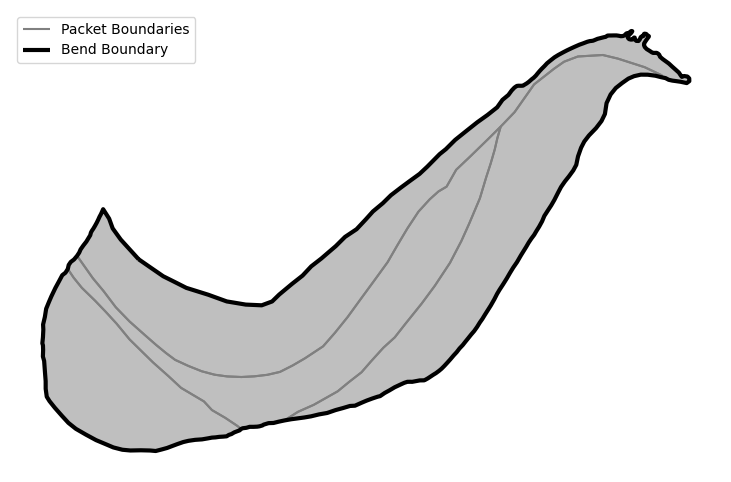
The packet boundaries are polygons that fit perfectly within, and cover entirely, the bend boundary polygons. Packet boundaries encompass groups of ridges with similar trajectories. Packet boundaries should have
bend_idcolumn as well as apacket_idcolumn. Thebend_idcan be used as a foreign key to relate the packets to their bend and the simplepacket_id(ex.p_01) can be used to diffferentiate the packets within each bend. There is no guarantee of an inherent order with packets, but in general, they can and should be numbered incrementally from the most ancestral to the most recent.
Ridges (LineString):
Ridges are manually created for each ridge on the bend. Ridge polylines can be created before the raster ridge classification process, however it is recommended that the binary ridge area rasters be used to help inform the creation of ridge polylines. Ridge polylines should have a
bend_idcolumn, aridge_idcolumn, and optionally apacket_idcolumn if packets are used. Thebend_idand optionalpacket_idcolumns can be used as foreign keys to relate ridges to the larger morphological features and the simpleridge_id(ex.r_001) can be used to differentiate ridges within a bend. To a greater degree than the packets, there is no guarantee of an inherent order to the ridges on a given bend. However, as seen in the accompanying manuscript, ridges often can, but are not guaranteed to, be ordered within packets.
Migration Pathways (LineString):
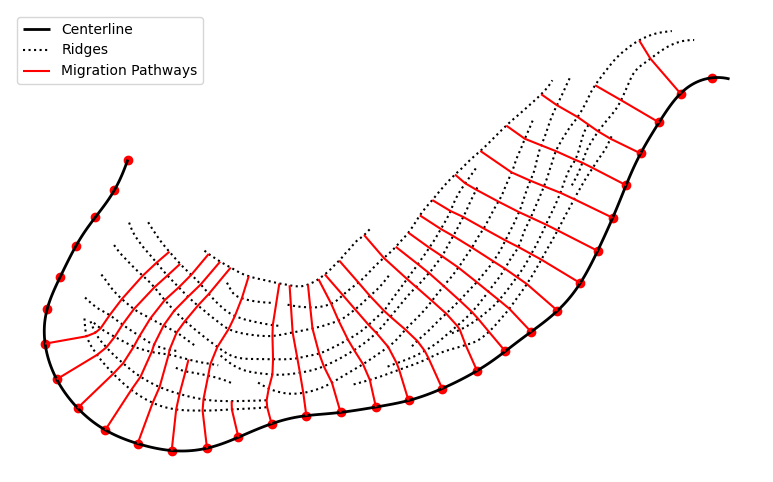
Migration pathways are algorithmically generated from the channel centerline and a set of ridges. The user specifies a set of starting points along the centerline from which the migration pathways will be generated. The migration pathway algorithm will “walk” up the flood plain until it fails to intersect any more ridges. The resulting migration pathways represent the varied paths of migration along a bend according to the depositional record contained in the ridge and swale topography
Note on point density for channel centerline and ridgelines
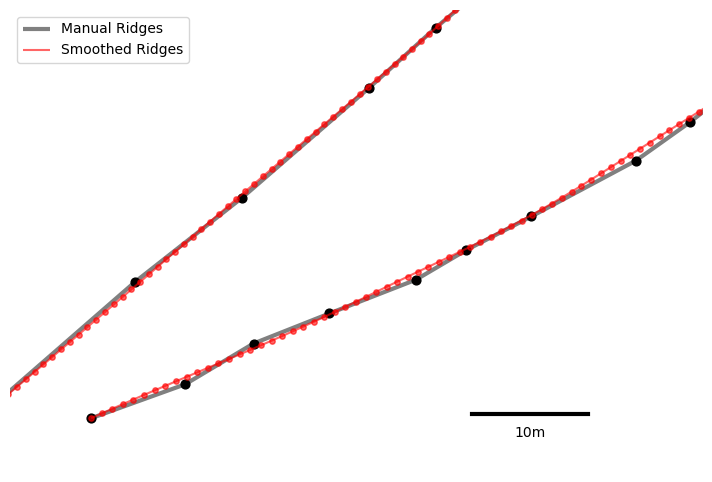
A high vertex density and high degree of “smoothness” are necessary for both the channel centerline and ridge lines when creating the migration pathways. It is recommended that you focus on capturing the overall ridge form, not point density, when delineating. Then, the coarse polylines can be densified and smoothed with the included LineSmoother class.
While all of these above datasets are used, not all are strictly necessary, not all are required at the beginning of the workflow, and some are generated from ScrollStats.
The details of use for each of these datasets are summarized below:
Required for Raster Processing:
Bend Boundary: the bend boundary is a required input from the user and is required for the raster processing. The bend boundary is the manual delineation of the topographically raised platform that conatians the ridge and swale topography of a bend.
Required for Migration Pathway Creation
Channel Centerline: the channel centerline generally follows the path of the water surface and should not intersect the bend boundary at all. The channel centerline should also extend past the channel-ward edges of the bend boundary. See note at the end of this cell on point density for channel centerline and ridge lines.
Ridges: ridges are manually created and should track the middle of each ridge area. While it is not necessary, it’s strongly recommended that both the DEM and ridge area raster be used to infer ridge line locations. See note at the end of this cell on point density for channel centerline and ridge lines.
Used for ridge metric calculation
Migration Pathways: migration pathways are created by ScrollStats, so the user does not need to worry about creating these as an input. Migration pathways are a series of transects that trace the supposed path of channel migration from the channel centerline. Migration pathways are used to sample both the DEM and ridge area raster to calculate ridge width, amplitude, and spacing for every point intersection of the migration pathways and ridge lines.
Packet Boundaries (optional): packet boundaries are the manual delineations of the depositional packets within a bend that contain groups of ridges with similar trajectorties. Packet boundaries fit perfectly within and cover entirely the bend boundary. Providing packet boundaries gives allows the user to aggregate ridge metrics to the packet scale in order to investigate changes in the hydrologic regime of the river.
Create Bend Boundaries
Use a desktop GIS software (QGIS, ArcGIS Pro, etc.) to manually delineate the bend boundaries.
If there multiple bends delineated for the same river, it is recommended to make
1 layer for the entire river and just add each bend as a feature (row) for that
layer. Additionally, each bend should have a short, unique ID that is shared
with the DEMs. For example, the 25th bend along the Lower Brazos River (starting
from Waco TX) is given the ID LBR_025.
At this stage, it is recommended to create the optional packet boundaries as
well. Similarly to the bend boundaries, it is recommended to make one layer for
all the packets in the river and just add each packet as a feature (row). Add a
“bend_id” column and a “packet_id” column. The bend id should correspond to the
bend_id of the encompassing boundary and it is recommended to have use a simple
incrementing packet id that corresponds to the apparent evolution of the bend.
For example, the most ancestral packet of LBR_025 has the packet_id of p_01
and the most recent, channelward packet has a packet_id of p_04. The
combination of the bend_id and packet_id columns forms the primary key for the
packets.
Example bend and packet boundaries can be found in the example_data directory included with ScrollStats. These boundaries are mapped below.
from __future__ import annotations

from pathlib import Path

import geopandas as gpd
import matplotlib.pyplot as plt
import numpy as np
from shapely.geometry import MultiPoint

from scrollstats import LineSmoother, create_transects

# User defined parameters
# LineSmoother
SMOOTHING_WINDOW_SIZE = 5  # Measured in vertices
VERTEX_SPACING = 1  # Distance between densified vertices; Measured in linear unit of dataset (meters for example datasets)

# Migration Pathway
SHOOT_DISTANCE = 300  # Distance that the N1 coordinate will shoot out from point P1; measured in linear unit of dataset
SEARCH_DISTANCE = 200  # Buffer radius used to search for an N2 coordinate on R2; measured in linear unit of dataset
DEV_FROM_90 = 5  # Max angular deviation from 90° allowed when searching for an N2 coordinate on R2; measured in degrees
bend_area = gpd.read_file("example_data/input/LBR_025_bend.geojson").set_index(
    "bend_id"
)
packets = gpd.read_file("example_data/input/LBR_025_packets.geojson").set_index(
    "packet_id"
)

fig, ax = plt.subplots(1, 1, figsize=(10, 6))

packets.boundary.plot(color="grey", ax=ax, label="Packet Boundaries")
packets.plot(color="grey", alpha=0.5, ax=ax)
bend_area.boundary.plot(color="k", lw=3, ax=ax, label="Bend Boundary")

ax.legend(loc="upper left")
ax.set_axis_off()
Create Channel Centerline and Ridgelines
After the ridge area rasters are created, manually create the ridge lines and channel centerlines.
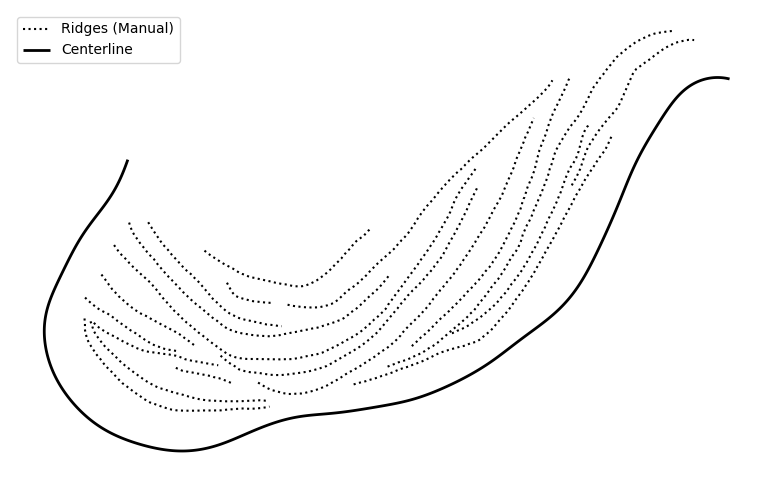
Example centerline and ridgelines can be found in the example_data directory included with ScrollStats. The centerline and ridgelines are mapped below.
ridge_path = Path("example_data/input/LBR_025_ridges_manual.geojson")
manual_ridges = gpd.read_file(ridge_path)

# Centerline is already smoothed and densified
cl_path = Path("example_data/input/LBR_025_cl.geojson")
cl = gpd.read_file(cl_path)

# Plot
fig, ax = plt.subplots(1, 1, figsize=(10, 6))

manual_ridges.plot(color="k", ls=":", ax=ax, label="Ridges (Manual)")
cl.plot(color="k", lw=2, ax=ax, label="Centerline")

ax.legend(loc="upper left")
ax.set_axis_off()
Line Smoothing
Apply LineSmoother to smooth and densify the lines
# Smooth and densify the lines
ls = LineSmoother(manual_ridges, VERTEX_SPACING, SMOOTHING_WINDOW_SIZE)
smooth_ridges = ls.execute()

# Save smooth ridges to disk
output_dir = Path("example_data/output")
smooth_ridge_name = ridge_path.with_stem(ridge_path.stem + "_smoothed").name
smooth_ridge_path = output_dir / smooth_ridge_name

smooth_ridges.to_file(smooth_ridge_path, driver="GeoJSON", index=False)

# Plot manual and smoothed ridges
fig, ax = plt.subplots(1, 1, figsize=(10, 6))
ax.set_aspect("equal")

manual_ridges_points = manual_ridges.geometry.apply(lambda x: MultiPoint(x.coords))
smooth_ridges_points = smooth_ridges.geometry.apply(lambda x: MultiPoint(x.coords))

manual_ridges.plot(ax=ax, color="grey", lw=3, zorder=1, label="Manual Ridges")
manual_ridges_points.plot(ax=ax, color="black", markersize=40, zorder=2)
smooth_ridges.plot(
    ax=ax, color="red", lw=1.5, alpha=0.6, zorder=3, label="Smoothed Ridges"
)
smooth_ridges_points.plot(ax=ax, color="red", markersize=15, alpha=0.6, zorder=4)

# scalebar
x_sb = 1067860
y_sb = 3111455
len_sb = 10
ax.plot((x_sb, x_sb + len_sb), (y_sb, y_sb), lw=3, color="black")
ax.text(x=x_sb + len_sb / 2, y=y_sb - 2, s=f"{len_sb}m", horizontalalignment="center")

ax.set_ylim(3111450, 3111490)
ax.set_xlim(1067820, 1067880)
ax.legend(loc="upper left")
ax.set_axis_off()
Create Migration Pathways
Now that the ridges and centerlines are created, we can create the migration pathways
A migration pathway can be created from any point along the centerline. Below we will create an array of starting points each roughly a channel-width apart (~100m for the Lower Brazos).
You can also create a set number of starting points by defining your step
distance as the channel length divided by the number of evenly spaced transects.
Migration Pathway Algorithm
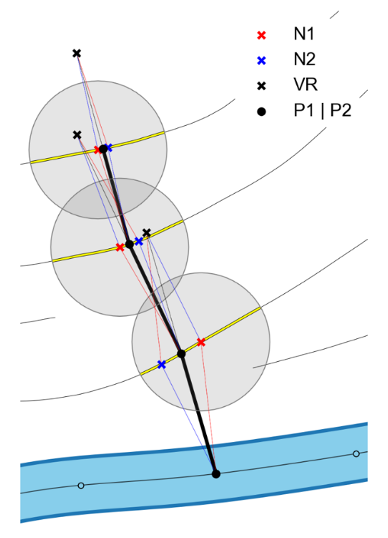
Our process involves ten major steps as follows:
Let the channel centerline be called R1
Select a starting point on R1, let this point be called P1
From P1, shoot a given distance perpendicular from R1 in the direction of the convex bank.
If the line intersects a ridge line, call this ridge R2 and proceed to step 5. If not, move on to the next location on R1 and repeat step 2.
Where this new line intersects R2, make a new point and call it N1
Buffer N1 by a given radius and search all vertices of R2 that intersect this buffer for a point from which a line may be drawn back to P1 that is perpendicular to R2. Call this new point on R2, N2.
Treating the lines P1->N1 and P1->N2 as vectors, calculate their vertical resultant and place a new point at the end of this vertical resultant. Let this point be called VR.
Where the line P1->VR intersects R2, place a point and let this point be called P2. Line P1->P2 is the migration pathway for this location on the floodplain.
Redefine P2 as P1
Repeat steps 3-9 until the perpendicular shot from P1 fails to intersect any ridges.
# define the distance between transects
step = 100

# With a vertex spacing of ~1m, take every `step`th vertex along the centerline
starts = np.asarray(cl.geometry[0].xy).T[::step]

# Generate transects
transects = create_transects(
    cl, smooth_ridges, step, SHOOT_DISTANCE, SEARCH_DISTANCE, DEV_FROM_90
)

# Save transects to disk
transect_path = output_dir / "LBR_025_transects.geojson"
transects.to_file(transect_path, driver="GeoJSON", index=True)

# Plot migration pathways alongside ridges and centerlines
fig, ax = plt.subplots(1, 1, figsize=(10, 6))

cl.plot(color="k", lw=2, ax=ax, label="Centerline")
smooth_ridges.plot(color="k", ls=":", ax=ax, label="Ridges")
transects.plot(color="r", ax=ax, label="Migration Pathways")
plt.scatter(starts[:, ::2], starts[:, 1::2], color="r")

ax.legend()
ax.set_axis_off()
Move on to Calculate Ridge Metrics
All vector datasets needed for ScrollStats are now created. Calculate Ridge Metrics will contain the example code to calculate ridge metrics from the ridges generated in this notebook and the ridge area raster created in Delineate Ridge Areas